One-Way Video Interview Invitation Email Template and Reminder Templates
Unsure what to send candidates? Adapt 12 video interview invitations and reminder email templates with clear deadlines and support. Build your invite now.
By Ekrama Taimuri
October 14, 2026
14 min read
TL;DR – Key Takeaways!
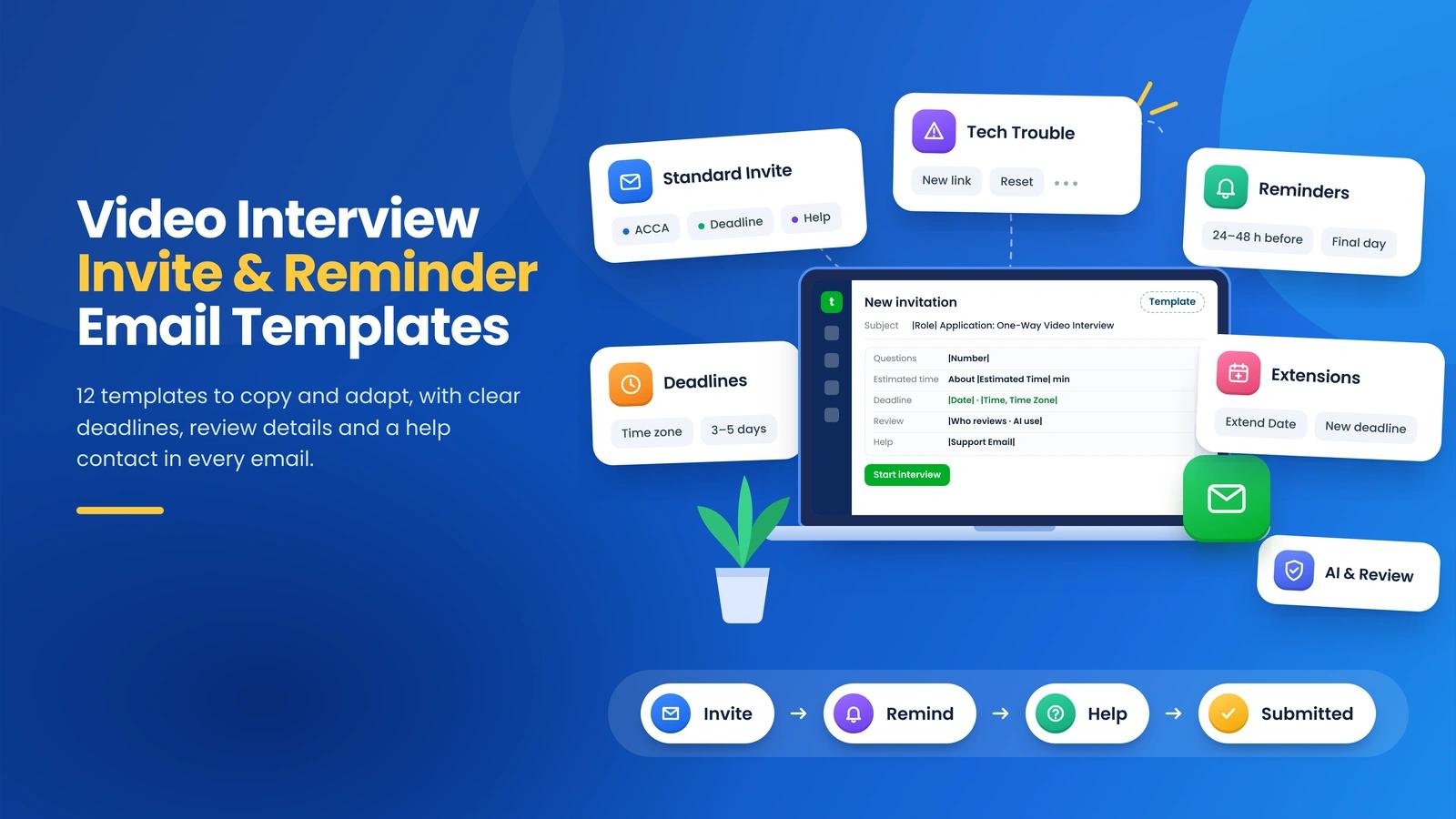
- Adapt 12 email templates for invitations, reminders, and candidate requests.
- State the task clearly: question count, total time, link, deadline, and help contact.
- Explain AI use and human review before candidates record answers.
- Check submission status before reminders and offer help when candidates face problems.
A one-way video interview invitation email template should name the role, explain the recording step, and include the question count, estimated total time, interview link, deadline, time zone, and help contact. Explain recording rules, AI use, and human review before candidates begin.
Below are 12 templates you can copy and adapt for invitations, reminders, technical problems, extensions, alternative formats, and candidate withdrawal. Go straight to the standard invitation template if you need an email now.
New to the format? Learn how a one-way video interview works before choosing the next step for your candidates, especially during high-volume hiring.
Key Elements of a One-Way Video Interview Invitation Email Template
Relevant and to-the-point details in an email are worth considering, as they help candidates understand what the process is all about and act accordingly.
1. Deadline
The time when submissions end is essential to mention in the email. All deadlines, including the link deadline and the completion timeline, must be clearly visible. You need to keep the hiring timeline organized, not just for yourself but for candidates as well.
Consider three to five business days as a starting point; adjust the window for interview length and candidate needs. If you have an extension as a backup for candidates with personal concerns, you can mention it as a possibility.
2. Platform Access
As you will be using a tool for the one-way interview, you have to explain the process: how the candidate will complete the assessment. Mention the platform name (such as TestTrick, a candidate screening platform backed by AI scoring suggestions, proctoring, and anti-cheating features).
Include an assessment link. Mention technical needs, such as which devices and browsers are compatible, and whether candidates can use a phone or a desktop computer. In addition, it’s advisable to ask candidates to check the link before starting to confirm that it works.
3. Accurate and Clear Instructions
Instructions on how candidates complete the one-way video interview might not need to appear in full email. It depends on you whether to include them in the email or show them after candidates click the submission link.
The instructions should be crystal clear: preparation time, answer time limits, question types, recording attempts and retakes, warnings about cheating, and the recording process explained through a demo video.
4. Help Information
For technical support, add an email address or phone number candidates can use to contact someone for help. You can also add a link to an FAQ page that explains fixes for technical issues. In addition, including a contact person’s details makes the process more supportive.
List the person’s name, email address, and expected response time so candidates know whom to ask, what questions they can ask, and when they can expect a reply. Moreover, giving access to a well-trained chatbot can also help candidates get assistance more conveniently and quickly.
5. Recording Rules, AI Use, and Human Review
Yes, AI disclosure needs attention. Explain who reviews answers, what AI tools do, and how your team uses the results before candidate's record. Unclear information can leave candidates unsure about how their video screening will be evaluated: by humans, AI, or both.
Keep the explanation brief and visible in the email. You can add further details to the instructions of candidates to see after clicking the link, before recording begins. Include who can access recordings, which tools process answers, and how long your company keeps the recordings.
How to Build the Right Format for Your One-Way Video Interview Invite
Before using a one-way video interview invitation email template, remember four writing guidelines.
Write a Clear Subject Line
The moment candidates look at the email; they should be able to recognize its purpose before opening it. Therefore, always mention the job title and the interview format.
For example:
- One-Way Video Interview Invite for [Job Title] at [Company]
- One-Way Video Interview Next Stage for [Job Title] at [Company]
- [Company] Video Interview Invite for [Job Title]
Keep the details near the beginning, as a phone screen can cut off a long subject line.
Start with the Candidate’s Name
Use a greeting: "Hi [Candidate Name]," or "Dear [Candidate Name],". For invitations, check the name and job placeholders before sending. Personalization should help each candidate recognize the message, not leave someone staring at an empty name field.
Make the Instructions Easy to Scan
Use bullets or numbered steps for the interview link, number of questions, estimated time, and submission deadline. Give each detail a label:
- Interview link: [Start Interview]
- Questions: [Number of Questions]
- Total time: [Number] minutes, including preparation and recording
- Deadline: [Day, Date, Time, Time Zone]
- Help contact: [Name, Email]
Use bold text for the main actions but keep the surrounding explanation in normal text. The link and deadline should stand out without making the whole email look like a warning sign.
Match the Tone to Your Company
Make sure the writing tone matches the company's branding style and industry.
For example:
If you choose a formal tone, an opening could be: "Your application has progressed to the video interview stage."
If you choose a friendly tone, a warmer version could be: "Congratulations on reaching the next stage for [Job Title]!"
Use the same closing statement, signature block, and sign-off message across all official communications.
Which Email Framework Fits an Interview Invitation?
Choose an email framework based on where the candidate stands in the hiring process. Someone who has already applied needs clear instructions. Someone you approach for a role, needs a reason to consider the opportunity.
AIDA and BAB can help with initial outreach, while ACCA can explain an unfamiliar screening process. Use each framework as a writing guide, keeping the message relevant to the candidate’s next step.
Use AIDA or BAB When Contacting Passive Candidates
Passive candidates have yet to apply and are happy with their current roles. Start by explaining why the opportunity deserves a conversation.
AIDA stands for Attention, Interest, Desire, Action.
- AIDA: Adds an opening step to draw the reader into the message.
- Interest: Mention relevant projects, skill, or achievement.
- Desire: Connect the experience with a specific opportunity in the role.
- Action: Invite a reply or a short conversation.
For example:
“Your work on [project] caught our attention. Our [Job Title] role includes leading [specific responsibility]. Would you be open to a short conversation?”
BAB stands for Before, After, Bridge.
Describe the candidate’s current work using known facts, explain the opportunity ahead, and show how the role connects the two.
For example:
“Your experience includes managing [type of project]. Our [Job Title] role offers responsibility for [larger scope]. Could we share more about the position?”
Base the appeal on real responsibilities and benefits (without assuming the candidate feels unhappy or wants a promotion). Introduce the recorded screening step once the candidate expresses interest.
Use ACCA to Explain the Screening Process
ACCA stands for Awareness, Comprehension, Conviction, and Action. The framework suits an invitation when candidates need more detail about how a pre-recorded video interview works.
- Awareness: Introduce the interview and explain its purpose.
- Comprehension: Describe the questions, recording process, and time needed.
- Conviction: Explain who reviews answers and how the team uses the results.
- Action: Provide the interview link, deadline, and help contact.
Build confidence through clear details. Any statement about AI scoring or human review should match the actual hiring process.
For example:
“The next stage for the [Job Title] role is a one-way video interview covering [job-related skills]. You’ll answer [number] questions in about [number] minutes. Our [Reviewer/team] will assess your answers against [criteria]. You can submit your answers through [link] by [date, time, time zone]. For questions or help, contact [email].”
How to Match Your Email to TestTrick’s Settings
TestTrick Invite Controls
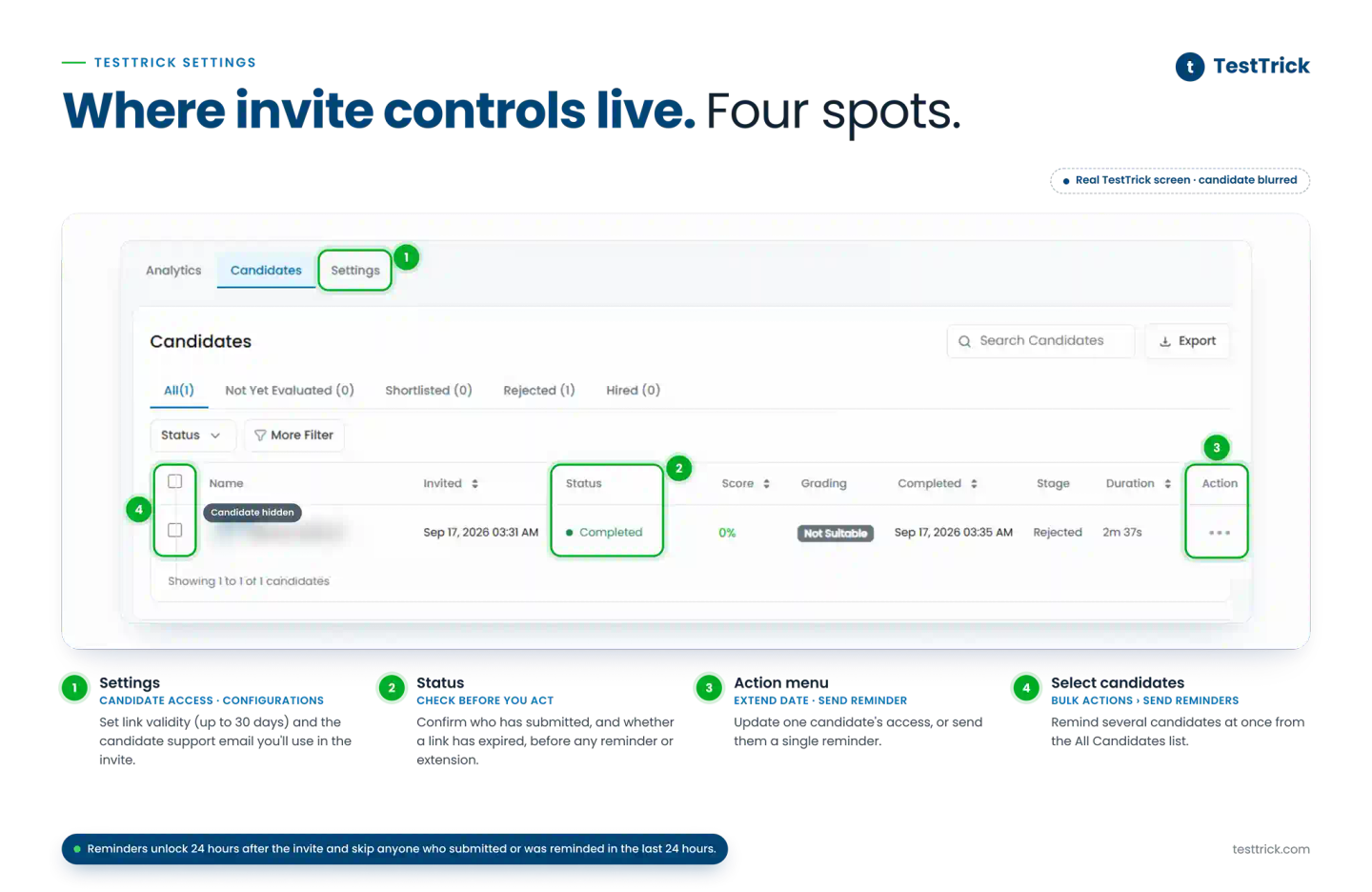
TestTrick’s help center documents controls you can check before sending an invitation or reminder:
In Candidate Access, check the invitation link’s validity. TestTrick supports up to 30 days of access; use the deadline you chose for the role in your email.
In Configurations, set the candidate support email. Use the same contact in your invitation so candidates know where to ask for help.
If a link expires, check the candidate’s status and use Extend Date to update access before confirming an extension.
For reminders, open the assessment’s All Candidates section. Use the candidate’s three-dot menu for Send Reminder or select candidates and use Bulk Actions > Send Reminders.
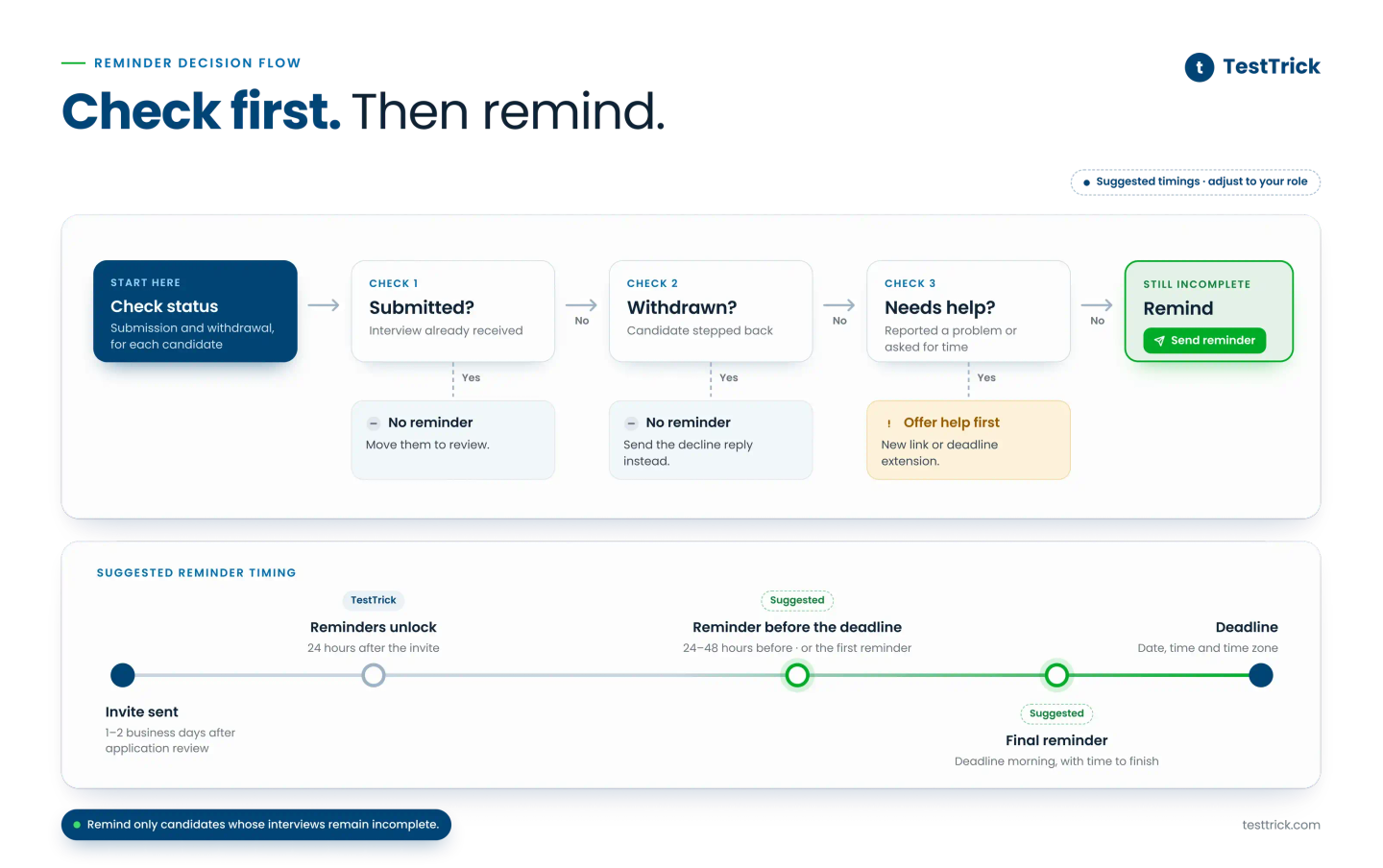
TestTrick enables reminders 24 hours after the invitation. Its reminder controls exclude candidates who have submitted or received a reminder within the last 24 hours.
Sources: TestTrick’s Candidate Access settings, assessment setup guide, and reminder email instructions.
Ready to put your invitation into practice? Explore TestTrick’s one-way video interview software to create recorded interview questions, invite candidates, and review answers.
One-Way Interview Email Templates at a Glance
| Email Template Type | Preferred Framework | Situation | Situation |
|---|---|---|---|
| Situation | ACCA | Applicants moving to recorded screening. | Within 1–2 working days of passing application review. |
| Short and friendly invite | AIDA | Candidates who need a brief, warm invitation. | Candidates who need a brief, warm invitation. |
| Formal invitation | ACCA | Teams explain the screening and review process in a formal tone. | After confirming the candidate’s next stage |
| High-volume hiring invitation | AIDA | Recruiters invite many candidates with personalized details. | After shortlisting the batch and confirming deadlines. |
| Invitation after a recruiter conversation | AIDA | Candidates who have already spoken with a recruiter. | After the conversation, according to the agreed next step. |
| First reminder | AIDA | Candidates who have yet to submit. | 24–48 hours before the deadline |
| Reminder before the deadline | AIDA | Candidates whose deadline is approaching. | 24–48 hours before the deadline, as an alternative to the first reminder. |
| Final reminder on submission day | AIDA | Candidates whose deadline falls today. | On the deadline morning, leaving time to complete the interview. |
| Reply to technical trouble | BAB | Candidates reporting recording or submission problems. | As soon as possible after the report; confirm the reset before sending the reset template. |
| Deadline extension confirmation | BAB | Candidates who have received approval for more time. | As soon as the extension is approved. |
| Offer of another screening format | BAB | Candidates who need an available alternative. | On the day of the request where possible or offer the route in the initial invitation. |
| Reply when a candidate decline | AIDA | Candidates withdraw from the process. | After receiving the decline, according to the team’s response schedule. |
Suggested timing
Send the invitation within one to two business days after application review, then consider one reminder 24–48 hours before the deadline. If needed, send a final reminder on the deadline morning, leaving enough time to finish.
Adjust the schedule for interview length, candidate needs, and platform controls. Use the first two reminder templates as alternatives. Respond to technical problems and approved extensions as soon as possible, following your team’s support schedule.
One-Way Video Interview Invitation Email Templates
A Standard One-Way Video Interview Invitation Email Template
Standard One-Way Video Interview Invitation
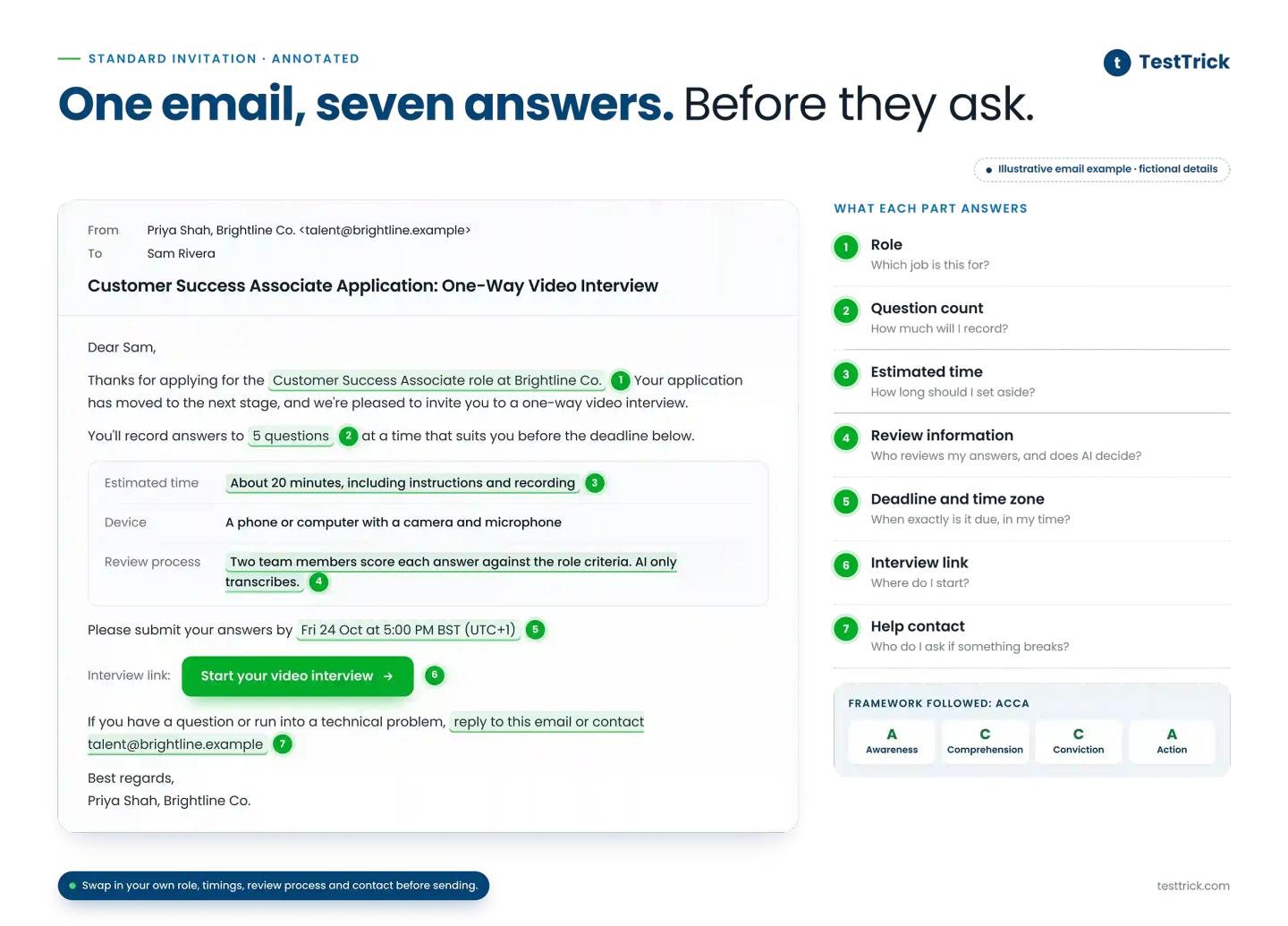
Framework followed: ACCA
Subject: |Role| Application: One-Way Video Interview
Dear |Candidate Name|,
Thanks for applying for the |Job Title| role at |Company Name|. Your application has moved to the next stage, and we’re pleased to invite you to a one-way video interview.
You’ll record answers to |Number of Questions| questions at a time that suits you before the deadline below.
Here are the details:
- Estimated time: About |Estimated Time| minutes, including instructions and recording
- Device: A phone or computer with a camera and microphone
- Review process: |Who reviews the answers, the scoring criteria, and any AI involvement|
Please submit your answers by |Date| at |Time and Time Zone|.
Interview link: |Interview Link|
If you have a question or run into a technical problem, reply to this email or contact |Support Email|.
Most regards,
|Recruiter Name|
|Company Name|
A Short and Friendly Interview Invite
Framework followed: AIDA
Subject: Your video interview for the |Job Title| role
Hi |Candidate Name|,
Congratulations on reaching the next stage for the |Job Title| role at |Company Name|! We’re inviting you to a short one-way video interview.
You’ll record answers to |Number of Questions| questions at a time that works for you. Your answers give us a chance to learn more about your experience beyond your resume.
Please submit by |Date| at |Time and Time Zone|.
Start here: |Interview Link|
If you have a question or run into a technical problem, email |Name or Email|.
Best,
|Recruiter Name|
|Company Name|
A Formal Invitation to Interview Email Template
Framework followed: ACCA
Subject: Interview invitation for the |Job Title| role at |Company Name|
Dear |Candidate Name|,
Congratulations! You have been selected for the next stage for the |Job Title| role at |Company Name|.
You have to record your answers to |Number of Questions| questions before the deadline. The interview takes about |Estimated Time|.
At this stage, we assess your experience and skills through your recorded answers. |Reviewer or Team| will assess the responses against |Job-Related Criteria|. |Explanation of any AI involvement|.
Please submit your answers by |Date| at |Time and Time Zone|.
Interview link: |Start Interview|
If you have a question about the assessment or run into a technical problem, contact |Name or Email|.
Sincerely,
|Recruiter Name|
|Company Name|
An Interview Invitation Template for High-Volume Hiring
Framework followed: AIDA
Subject: One-way video interview for the |Job Title| role
Hi |Candidate Name|,
You’re invited to complete a one-way video interview for the |Job Title| role at |Company Name|.
Your answers will give us more details about your experience and skills beyond your resume. You can record at a convenient time before the deadline, without scheduling a live call.
Here are the details:
- Question count: |Number of Questions|
- Estimated time: |Estimated Time|
- Deadline: |Date and Time, Time Zone|
- Interview link: |Start Interview|
Record your answers to the interview questions and submit them before the deadline.
Find a quiet place and use your phone or computer. If you run into a technical issue, check the attached PDF guide or contact |Support Email|.
Most regards,
|Recruiter Name|
|Company Name|
An Invitation Email After a Recruiter Conversation
Framework followed: AIDA
Subject: Next step for the |Job Title| role
Hi |Candidate Name|,
Glad to connect with you again. Congratulations! You've made it to the next stage.
At this stage, we are inviting you to a one-way video interview to learn more about your experience and skills beyond your resume for the |Job Title| role at |Company Name|.
Just record your answers to the interview questions and submit them before the deadline.
Here are the details:
- Question count: |Number of Questions|
- Estimated time: |Estimated Time|
- Deadline: |Date| at |Time and Time Zone|
- Interview link: |Start Interview|
For the test, find a quiet place and use your phone or computer. In case of technical issues, consult the attached PDF guide for instructions or contact |Support Email|.
Most regards,
|Recruiter Name|
|Company Name|
One-Way Interview Reminder Email Templates
One-Way Interview Reminder
A First Reminder for Candidates Who Have Yet to Submit
Framework followed: AIDA
Subject: Still keen on the |Job Title| role? Your video interview is waiting
Hi |Candidate Name|,
Just checking in. We haven't received your video interview for the |Job Title| role yet, and I didn't want it to slip past you.
There's nothing to schedule. You record your answers on your own when you have about |Estimated Time| in a quiet place. Your answers give the hiring team more detail about your experience and skills.
Please submit by |Date| at |Time and Time Zone|.
Here's your link: |Start Interview|
If the link plays up or you'd like to ask something before you hit record, reach out to |Name or Email|.
Best,
|Recruiter Name|
A Reminder Before the Interview Deadline
Framework followed: AIDA
Subject: Your |Job Title| video interview is due |Date|
Hi |Candidate Name|,
A heads-up that your video interview for the |Job Title| role is due on |Date| at |Time and Time Zone|.
There's still time to complete the recording. Your answers give us a chance to consider your experience alongside your application, and you can record without arranging a live call.
Please submit your answers before the deadline.
Here's your link: |Start Interview|
If something comes up and you need a hand or a little more time, let |Name or Email| know before the deadline.
Best,
|Recruiter Name|
A Final Reminder on the Submission Day
Framework followed: AIDA
Subject: Last day to send in your |Job Title| video interview
Hi |Candidate Name|,
One last nudge from |Company|. Your video interview for the |Job Title| role is due today at |Time and Time Zone|.
The recording gives you a chance to explain your experience in your own words before the team reviews your application.
If you're still planning to take part, please send your answers before the deadline.
Here's your link: |Start Interview|
If a technical issue is getting in the way, tell |Name or Email| so we can look into the problem.
All the best,
|Recruiter Name|
Email Templates for Interview Problems and Requests
A Reply When a Candidate Has Technical Trouble
Framework followed: BAB
Subject: |Role| assessment: a new link for you
Dear |Candidate Name|,
We received your message about the assessment freezing at question |Number|.
Your attempt has been reset, and a new link is ready.
To continue, check your connection and open the link below in a supported browser. Please submit your answers by |Day, Date, Time, Time Zone|.
New assessment link: |New Assessment Link|
If the page stalls again, reply to this email or contact |Support Email|. A screenshot and the time of the problem will help us investigate it.
Most regards,
|Your Name|
|Job Title|, |Company Name|
An Email Confirming a Deadline Extension
Framework followed: BAB
Subject: Updated deadline for the |Role| assessment
Dear |Candidate Name|,
You contacted us because you needed more time to complete the assessment before |Original Deadline|.
Your new deadline is |Day, Date| at |Time| (|Time Zone|). The assessment still has |Number of Questions| questions and takes about |Estimated Time| minutes.
Your original link still works, so you can use it to submit your answers.
Interview link: |Interview Link|
If you have trouble opening the link or finishing the assessment, contact |Support Email| before the new deadline so we can review the problem.
Most regards,
|Your Name|
|Job Title|, |Company Name|
An Email Offering Another Screening Format
Framework followed: BAB
Subject: Another way to complete the |Role| screening
Dear |Candidate Name|,
You raised concerns about completing our standard screening format.
Yes, we offer other options. You can choose a format that works better for your schedule and preferences.
Please choose from the two options below:
- Written answers: You can respond to the screening questions in writing, due by |Day, Date|.
- Self-recorded video/audio: You can submit a short recording answering the screening questions, due by |Day, Date|.
Reply to this email with your preferred format by |Day, Date|. Once we hear from you, we’ll send the instructions for your chosen option.
Most regards,
|Your Name|
|Job Title|, |Company Name|
A Reply When a Candidate Declines the Interview Invite
Framework followed: AIDA
Subject: Re: |Role| interview at |Company Name|
Dear |Candidate Name|,
We received your note and understood your decision to step back from the |Role| interview process.
Future opportunities could offer a better fit for your skills and preferences. If you would like us to contact you about relevant roles, reply to let us know.
If you are open to sharing what influenced your choice, we would welcome the feedback—though there is no pressure to do so.
For questions about your application or data privacy, please contact |Privacy Contact or Email|.
Most regards,
|Your Name|
|Job Title|, |Company Name|
Frequently Asked Questions
How Much Time Should Candidates Have to Complete the Interview?
Consider three to five business days as a starting point. Adjust for interview length and candidate needs and explain extension requests.
What Should Recruiters Do When a Candidate Has Yet to Reply?
Check delivery and submission records. If the interview remains incomplete, send a helpful interview reminder email a day before the deadline.
How Does a One-Way Interview Invite Differ from a Zoom Interview Invitation?
A one-way interview invitation gives a recording deadline. A Zoom interview invitation gives a live meeting time, meeting link, and interviewer details.
How Do You Check an Interview Invitation Email Before Sending?
You can confirm the role, hiring stage, recording settings, review process, link, deadline, and placeholders. You also have to check submission status before sending reminders.
Build a Hiring-Ready Assessment
Create role-specific, anti-cheat assessments and shortlist candidates on evidence, not guesswork.
Start for freeBy Ekrama Taimuri
October 14, 2026
14 min read
Build a Hiring-Ready Assessment
Create role-specific, anti-cheat assessments and shortlist candidates on evidence, not guesswork.
Start for free