English

Greenhouse
Streamline your hiring process by connecting Greenhouse's applicant tracking system with TestTrick's advanced skill assessments. Invite candidates to assessments directly from Greenhouse, automatically sync assessment statuses and results back into the ATS, and view candidate scores—all from one unified platform.
Learn how to send out TestTrick's assessment and review results in Greenhouse
Once you have activated TestTrick's integration with Greenhouse, you are ready to start sending out assessments to your job applicants through Greenhouse. In this article, you will learn how this is done:
With this integration, recruiters can:
- • Invite candidates to TestTrick assessments directly from Greenhouse
- • Select specific assessments to attach to each job's interview plan
- • Track assessment progress and completion status automatically
- • Review summarized candidate results, including scores inside Greenhouse
- • Access the full candidate report in Testtrick via a direct link
Prerequisites
Before enabling the integration, make sure:
- • You have an active Testtrick account.
- • You have Owner or Admin access in Testtrick.
- • You have the appropriate plan and access level in Greenhouse (check with Greenhouse support).
How do I set up the Testtrick integration?
Setting up the integration involves two steps: connecting Testtrick to Greenhouse, and then configuring it within your Greenhouse job setup.
Step 1: Connect the Integration
- Log in to your Testtrick account.
- Navigate to Settings → Integrations.
- Locate the Greenhouse integration and click Enable.
- Once enabled, your unique API Key will be displayed. Copy it — you'll need it in the next step.
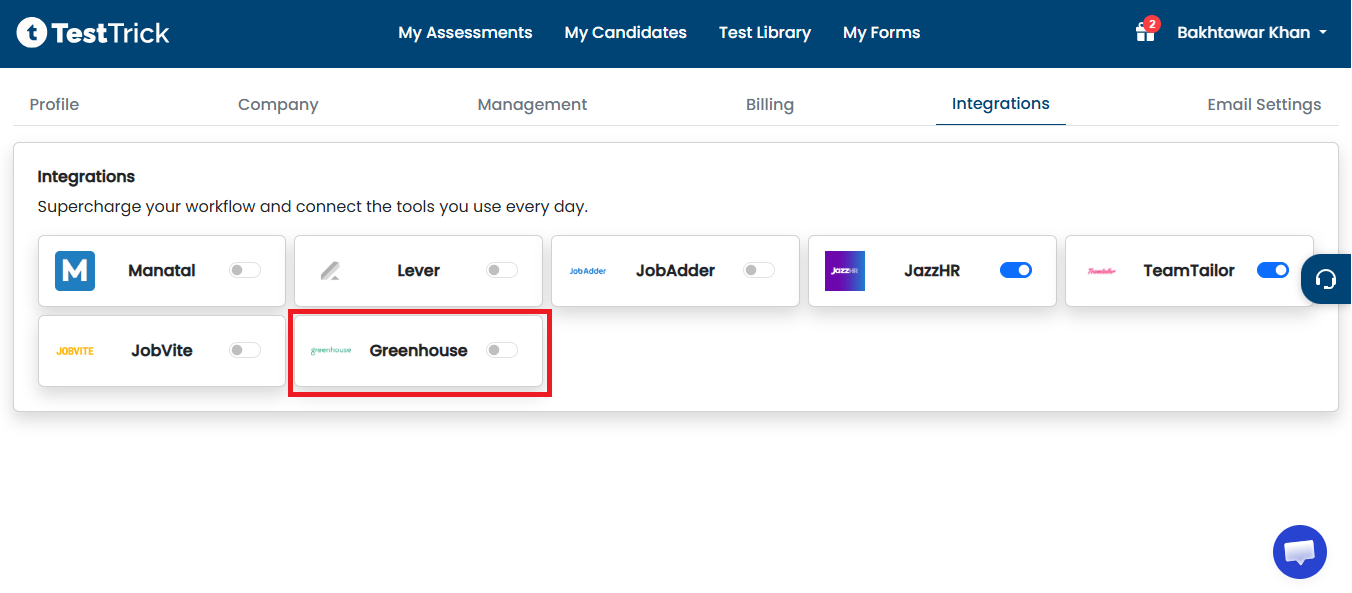
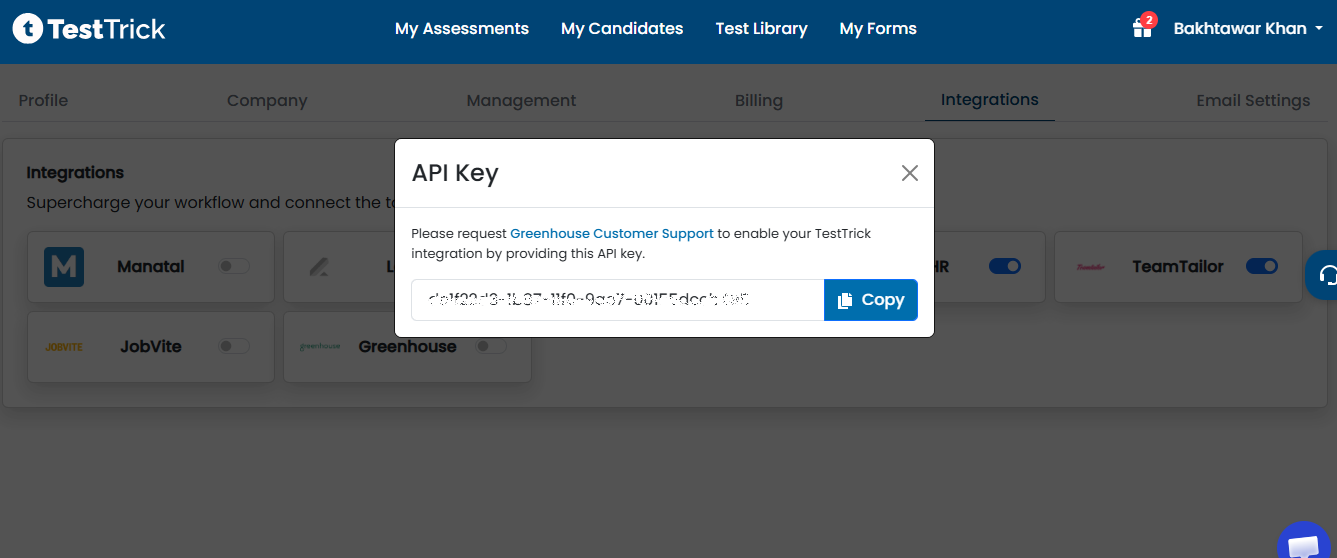
Note: The API key is tied to your Testtrick account. Keep it secure and do not share it publicly.
Step 2: Request Greenhouse Support
Greenhouse requires you to contact them directly to activate the integration on their end. Raise a support ticket with Greenhouse to initiate this process.
Request Greenhouse Customer Support →
Greenhouse will complete additional steps on their side to activate the integration. Once confirmed, you can proceed to configure it.
How do I send a candidate a Testtrick assessment?
Once the integration is active, you can invite any candidate to a Testtrick assessment directly from their application page.
- Select All Jobs from the top toolbar.
- Select the relevant Job Name from the list.
- Click the Job Setup tab.
- Select Interview Plan from the left toolbar.
- Click + Add a Stage.
- Choose Testtrick from the list and click Add.
- Select Testtrick Stage and click Edit.
- Select the required Testtrick assessment from the Test name dropdown menu.
- Assign at least one Greenhouse user to review the assessment results.
- Click Save to finish.
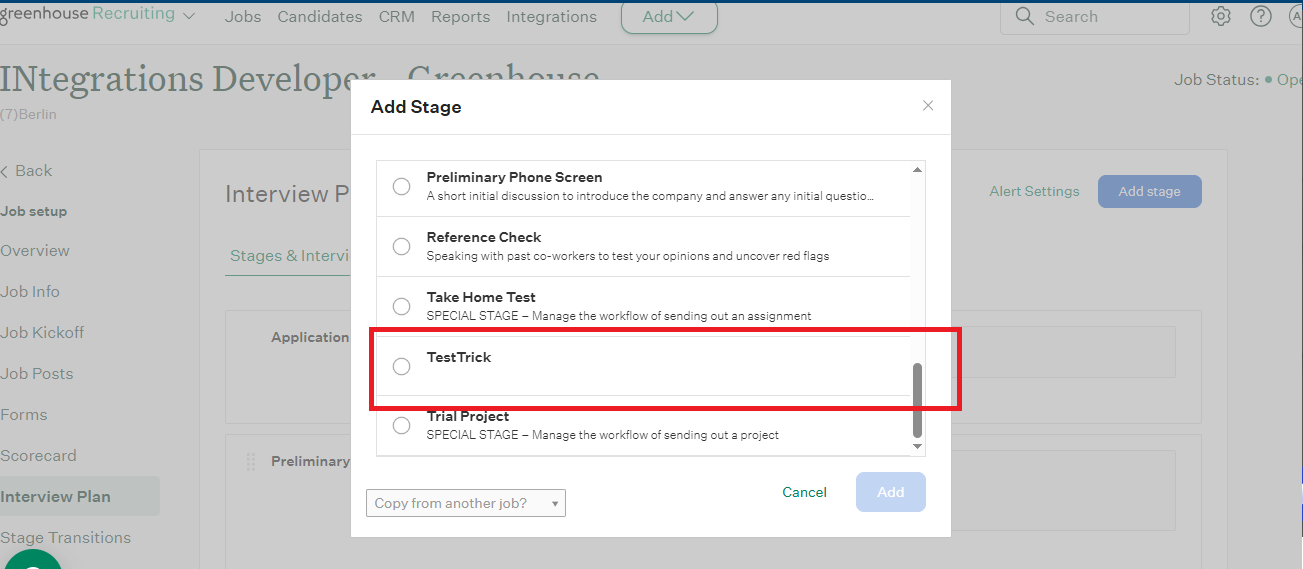
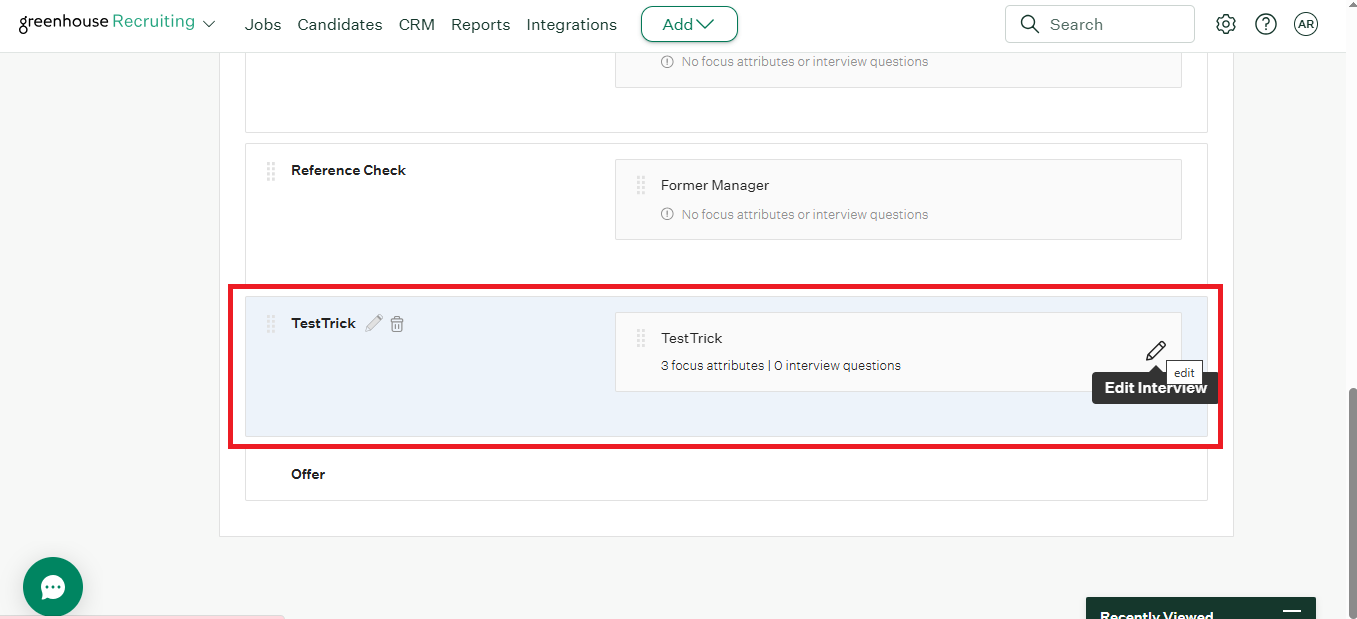
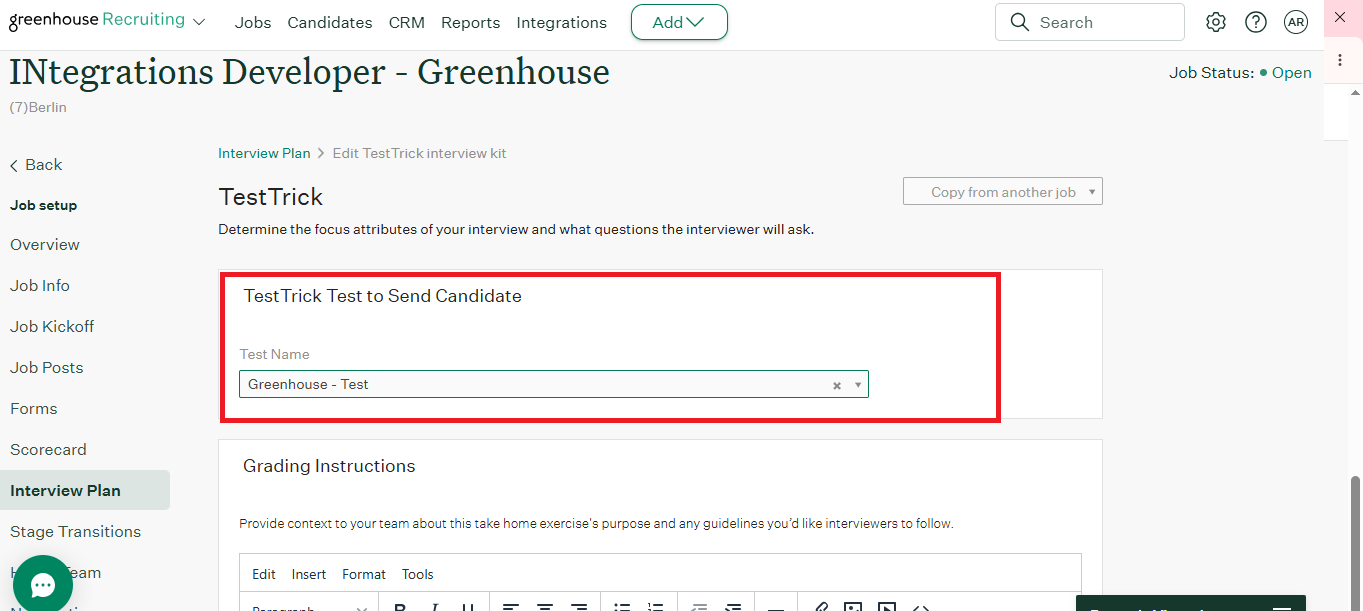
Invite Candidates to an Assessment
- From the candidate's Greenhouse record, select Stages from the left toolbar.
- Click Move Stage to advance the candidate to the Testtrick stage.
- Click Send Test.
- In the pop-up box, confirm the candidate's email address and assign a grader.
- Click Send Test to send the invitation to the candidate.
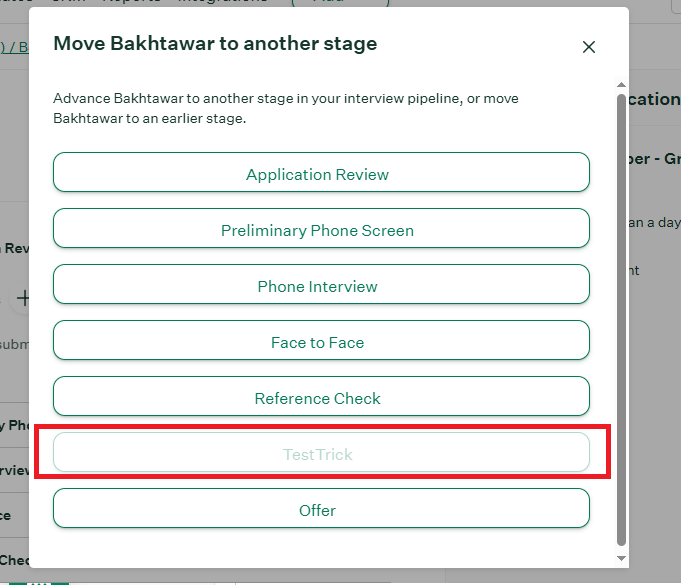
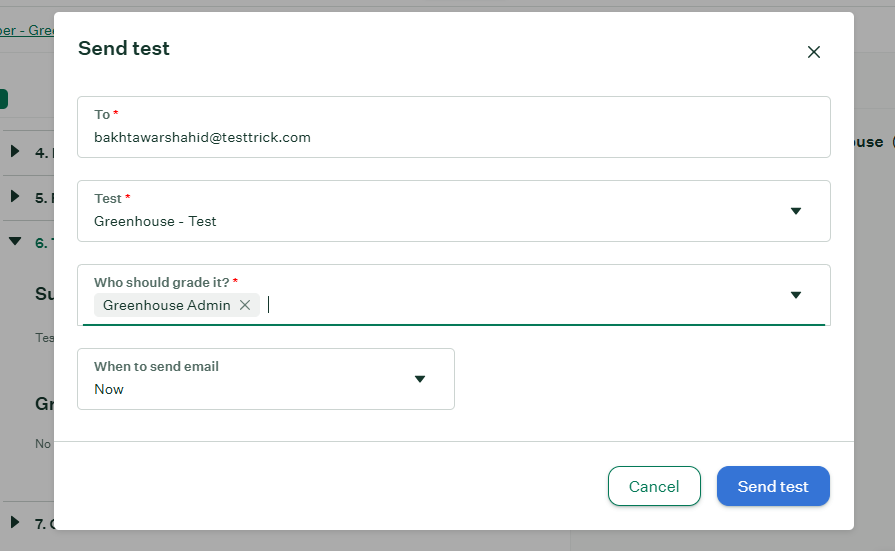
Note: The assessment email will not be sent unless you click the Send Test button. Simply moving the candidate to the stage is not enough.
Testtrick will send an invitation email to the candidate with a link to begin their assessment.
How do I track a candidate's assessment progress?
After an invitation is sent, Greenhouse automatically tracks the candidate's assessment status. The following information is displayed in the Testtrick hiring stage inside Greenhouse once the assessment is completed:
- A link to the candidate's page in Testtrick.
- A score of the assessment.
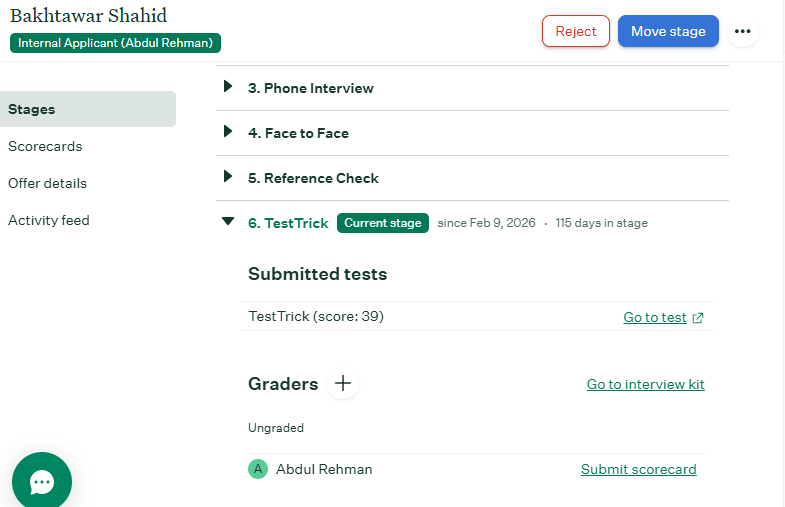
Note: To view the full results, click Go to Test to open the candidate results page inside Testtrick.
How do I disable the Integration?
If you no longer want to use the Testtrick integration with Greenhouse, you can disable it at any time from within the Testtrick app.
- In Testtrick, click your name in the top right corner and select Integrations from the drop-down menu.
- Click the Disable button on the Greenhouse integration.
- Click Disable on the confirmation pop-up to complete the process.
Frequently asked questions(FAQs)
Curious about TestTrick? Here are the answers to some frequently asked questions about our company.
Contact Us
FlyPearls LLC. 8 The Green # 4367 Dover, DE 19901 United States
+1 302 261 5361